DiGiCo Console Integration
As of transform.engine v1.4.0, you can synchronise your DiGiCo console running V20 software or higher to your transform.engine via the network. Features supported are:
- View and control plugins using the Console's touchscreen, including touch & turn support where the plugin supports it.
- Snapshot sync: When snapshots are created or fired on the console, the transform.engine will follow.
- Session sync: When a session is loaded on the console, an associated showfile is loaded on transform.engine.
There is no configuration on the transform.engine itself to configure the integration. For details on how to configure the integration on the console, please refer to the DiGiCo documentation.
Gotchas
When using the integration, you should bear the following in mind:
- When using the integration to view and control plugins, the Dante patch must be 1-1: channel 1 on the console's Audio IO interface must be patched to Dante 1 on the transform.engine.
- Sync is one-way, from the console to transform.engine. No changes made using the transform.client software will be synchronised to the console: the transform.engine cannot control the console.
- When using snapshot sync, the console will create a "Digico" cuelist on transform.engine. You should let the console use this cuelist exclusively and not modify it manually, or sync may be interrupted.
- Only one console can use the snapshot / session sync at a time. If one engine is being shared between consoles, be sure to only enable snapshot / session sync on one of the two consoles.
- When configuring the IP addresses of the network, if using multiple networks
(e.g. primary and secondary, or non-converged primary and control), be sure
to ensure that each network has a non-overlapping subnet. For example, you
could use
192.168.1.0/24for Dante Primary,192.168.2.0/24for Dante Secondary, and192.168.3.0/24for control.
Setup
We have made some handy setup guides for the various connection configurations that are possible.
Point to Point (separate)
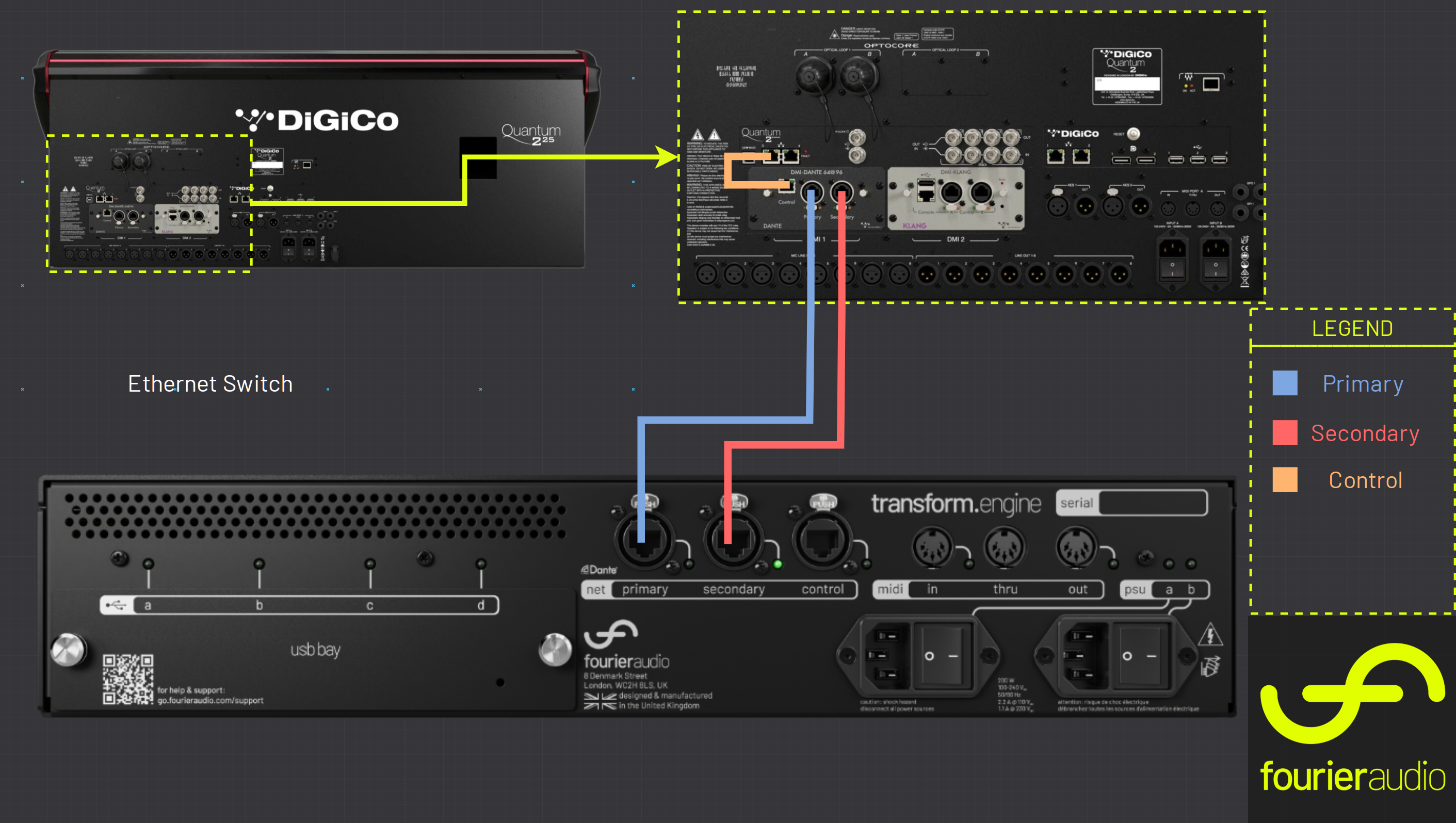
This system is a simple point-to-point architecture demonstrating how a Fourier transform.engine can be integrated with a DiGiCo console. In this setup, a Q225 console is directly linked to a single transform.engine, providing a streamlined and efficient workflow. The integration allows seamless access to the DSP resources, enabling real-time processing and low-latency operation. Control and Dante networks remain separate, ensuring simplified networking architecture. This setup showcases a direct, high-performance connection between the Q225 and the transform.engine, making it an ideal approach for venues or productions requiring a compact yet powerful processing solution.
Point to Point (combined)
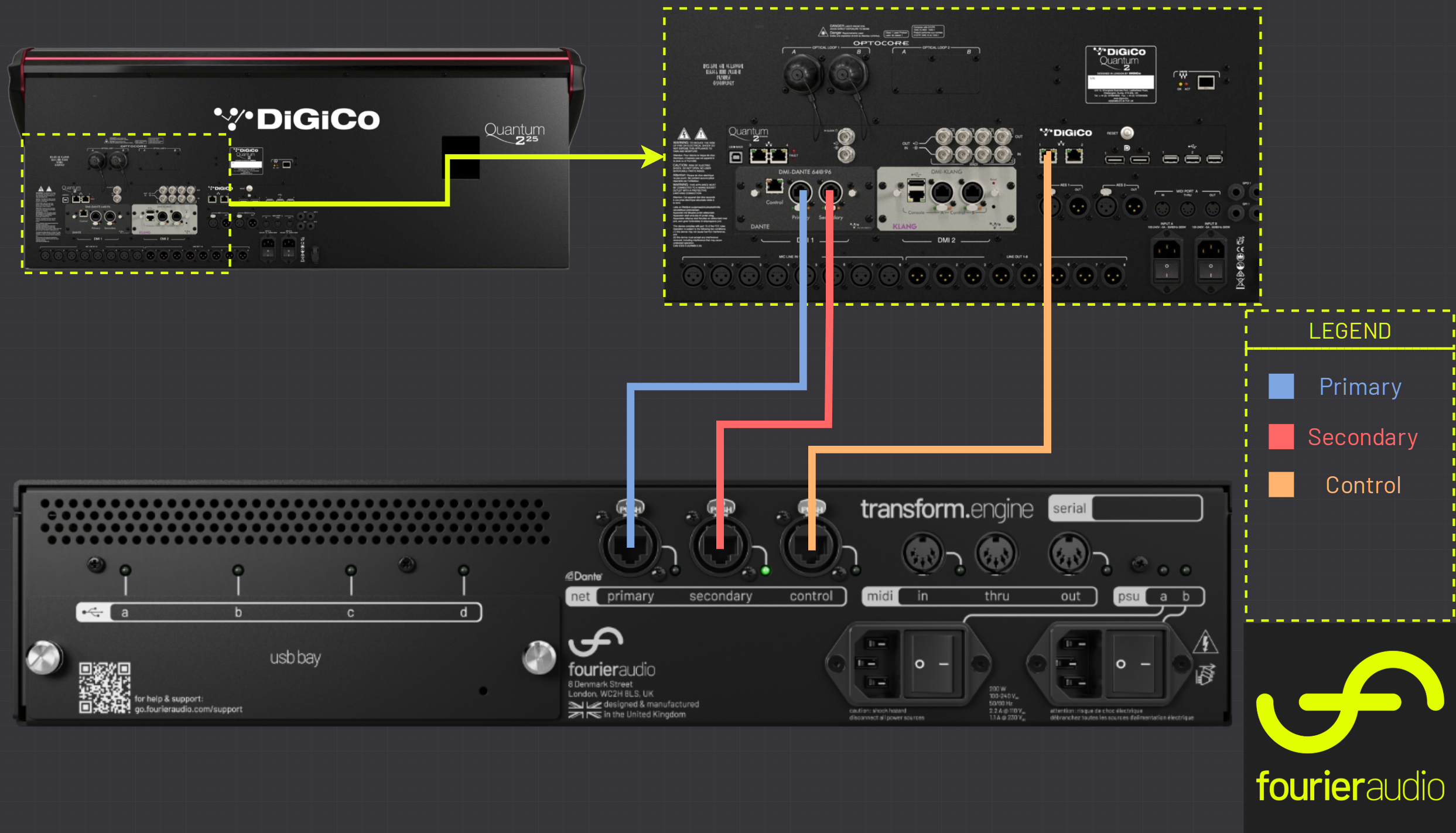
This system is a simple, single-console setup integrating a Fourier transform.engine with a DiGiCo Q225 console. A single transform.engine is directly linked to the console, with control and Dante operating on the same network. This architecture simplifies deployment while maintaining seamless access to the Console Integration, enabling real-time processing with minimal latency. By sharing a unified network for both control and Dante, the system reduces infrastructure complexity, making it an efficient solution for environments where a straightforward, high-performance audio processing workflow is required.
Point to Point (no switch)
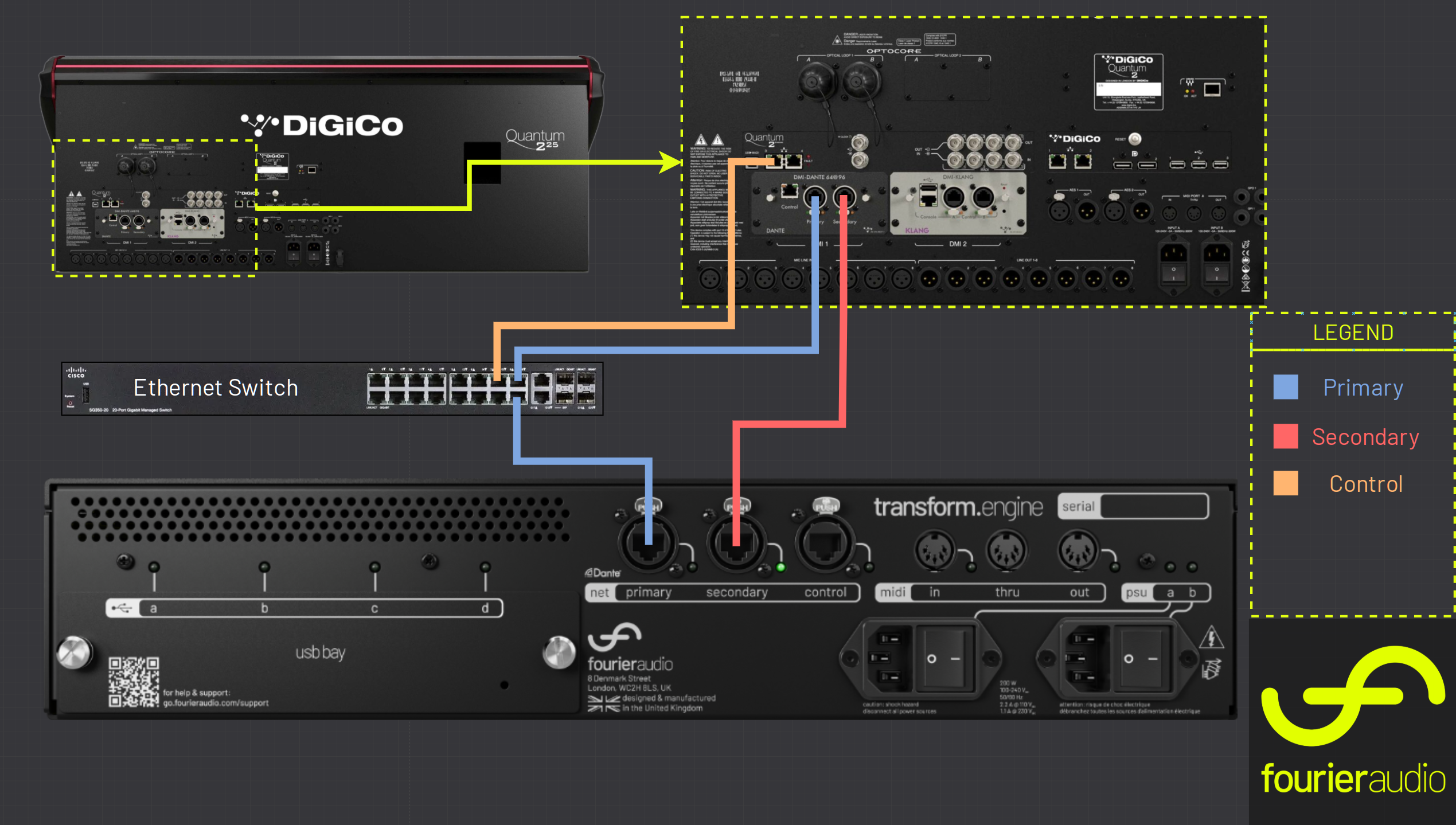
This system is a simple, single-console setup that is usable with no external network switch. To use this setup, you will need to temporarily use a switch to connect a laptop to run Dante Controller to set up the Dante patch, but once set up you can remove the switch and computer.
You must ensure that the Dante-DMI card has been upgraded to the very latest firmware to use this setup, otherwise your DiGiCo engine may be exposed to excess multicast traffic which can cause issues.
Dual Engine
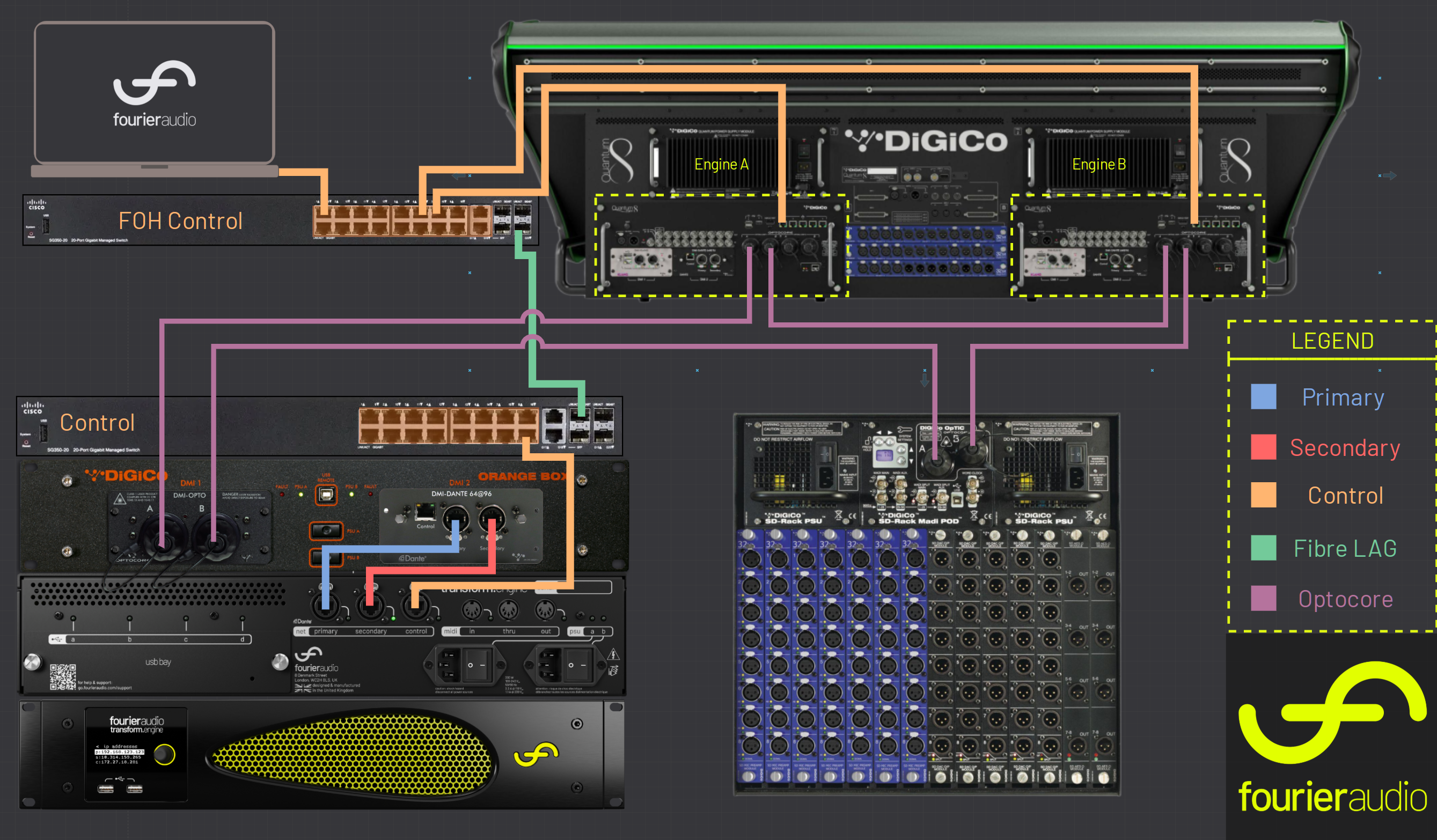
In this system, a transform.engine is shared across both engines of a dual engine console. A Optocore to Dante converter (DiGiCo Orange Box) is utilised to insert the transform.engine into an Optocore loop, enabling for seamless control and connectivity across both engines. The control network is sent through a distributed network configuration to provide DiGiCo console integration. This architecture allows for the engineer to switch engines and maintain transform.engine console integration. This example shows two switches using a fibre LAG, but note that this is not required.
Dual Console
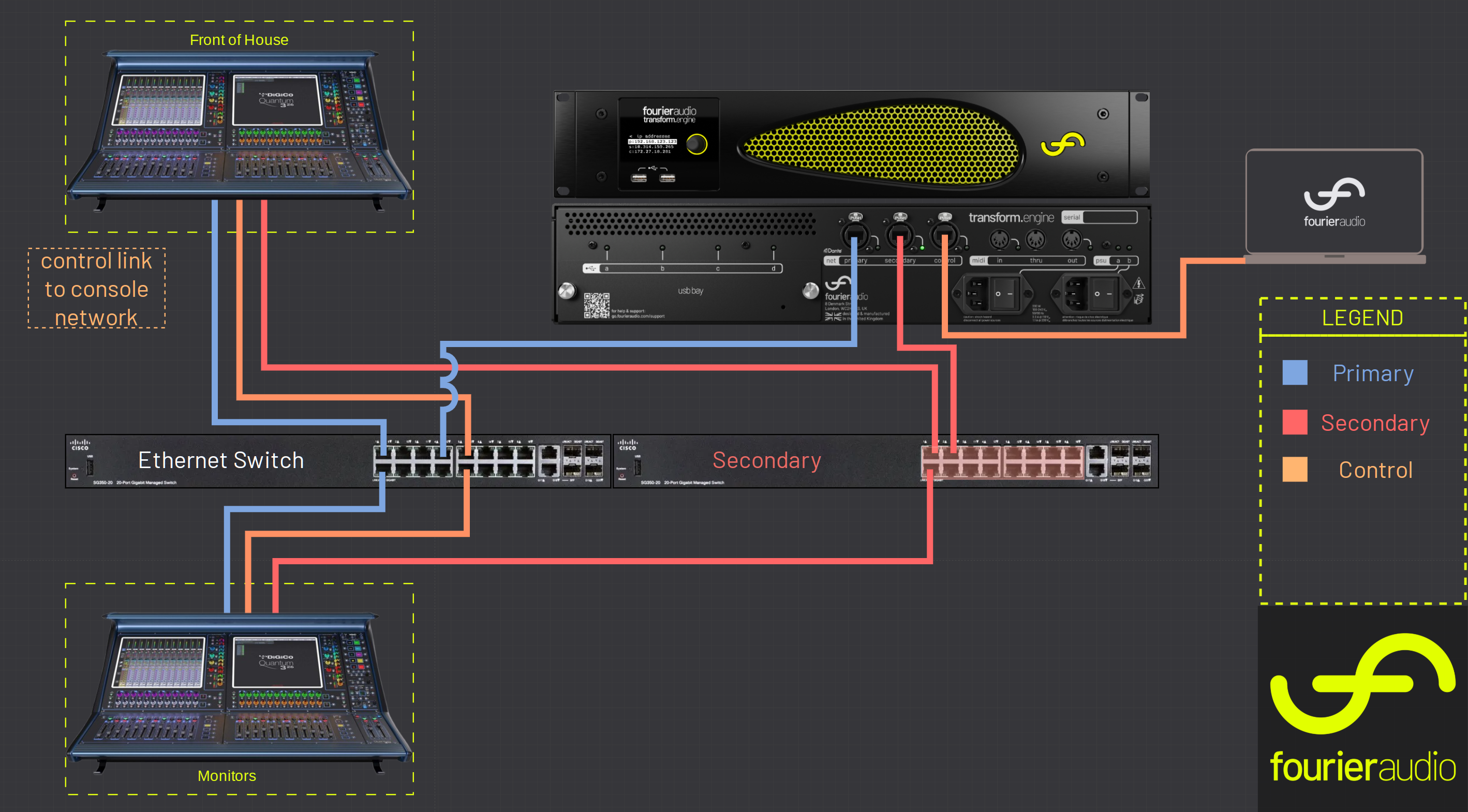
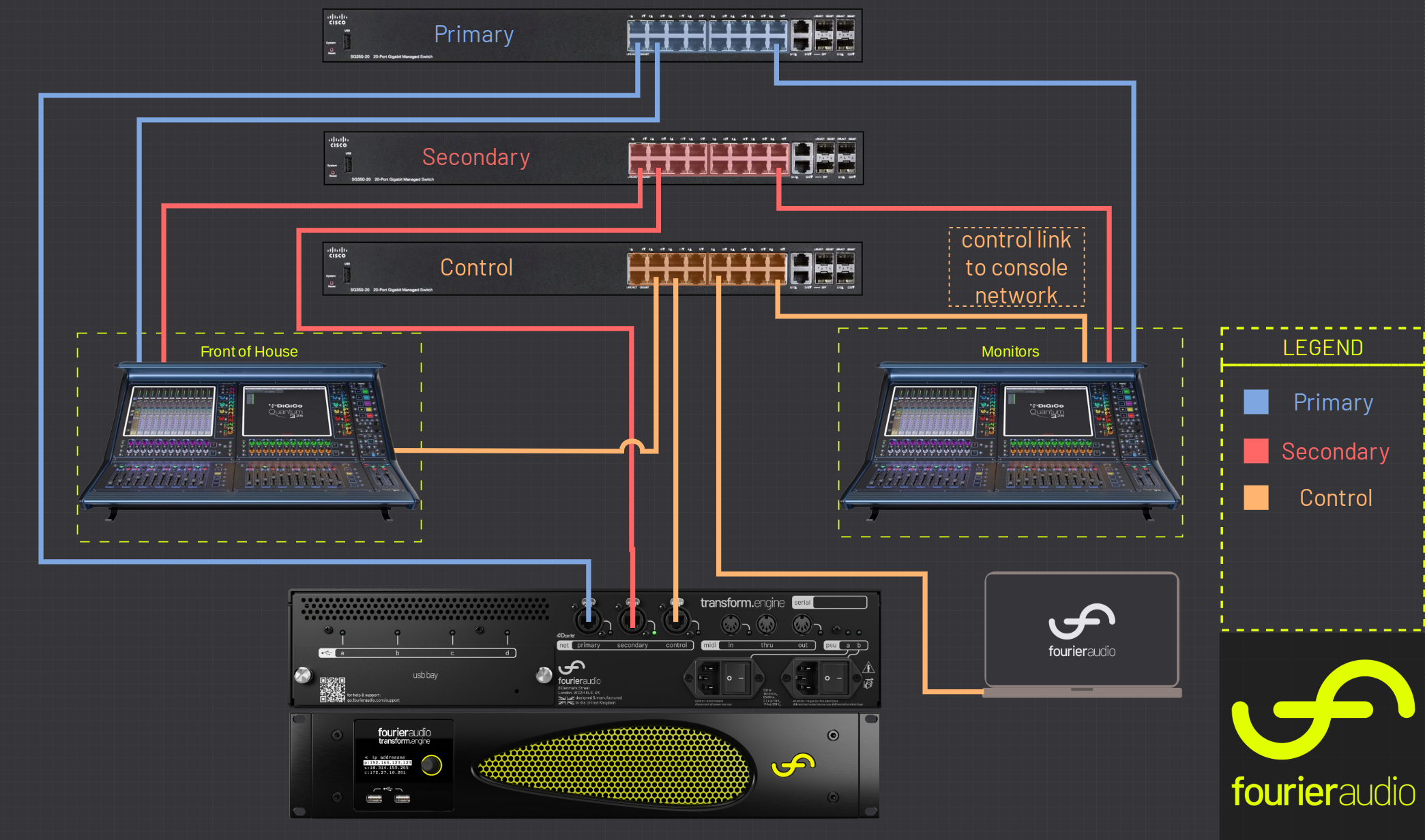
In this system, a single transform.engine is shared between Front of House (FOH) and Monitors (Mons), with shared racks positioned at the monitor console. Control and Dante operate on separate networks, ensuring reliable, low-latency audio transport while maintaining independent control paths. When using multicast or similar network protocols, proper network segmentation prevents interference and ensures efficient data distribution. The transform.engine provides centralised processing, allowing both FOH and Mons engineers to control a single transform.client simultaneously via the application on isolated network segments. This architecture optimises DSP resources, minimises hardware redundancy, and ensures seamless operation without network congestion or control conflicts.
Dual Console (converged control network)
In this system, a single transform.engine is shared between Front of House (FOH) and Monitors (Mons), with shared racks positioned at the monitor console. Control and Dante operate on separate networks, ensuring reliable, low-latency audio transport while maintaining independent control paths. The transform.engine provides centralised processing, allowing both FOH and Mons engineers to control a single transform.client simultaneously via dedicated control surfaces on isolated network segments. This architecture optimises DSP resources, minimises hardware redundancy, and ensures seamless operation without network interference or control conflicts.
Note there is no VLAN operating, the devices in this architecture are able to handle shared network traffic.